Configure Preliminary Scoring
Pick the scoring system, set yes/maybe limits, choose the heat count, and save the prelim configuration.
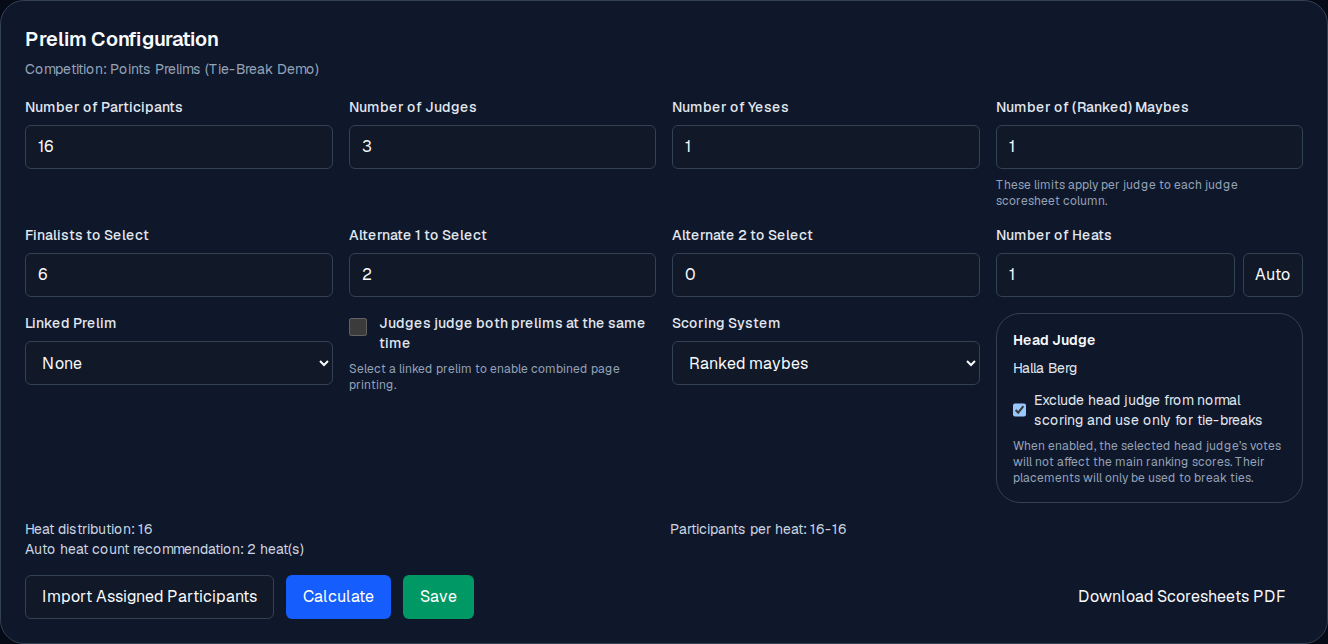
The Prelim Configuration section holds every scoring rule for a preliminary competition. The values are per-competition, so two prelims at the same event can use different systems.
You need the competition created and the participants assigned (see Assign participants).
The controls
Open the competition: Manage → → scroll to Prelim Configuration.
| Control | What it does |
|---|---|
| Number of Participants | Dancer slots in the grid. Increase to grow it. |
| Number of Judges | Judge columns. Adding more appends empty names for you to fill. |
| Number of Yeses | The most yes votes a single judge may cast (usually 1). |
| Number of (Ranked) Maybes | The most maybe slots a judge may fill. These caps are per judge, per column. |
| Finalists to Select | How many finalists this prelim should produce. |
| Alternate 1 to Select / Alternate 2 to Select | How many alternates to track at each tier. |
| Number of Heats | How many groups to split the field into. Use Auto to let the app pick a sensible count. |
| Linked Prelim | Another prelim in the same event to pair for a side-by-side scoresheet (see Link two prelims). A final is not a valid choice. |
| Judges judge both prelims at the same time | Check if the same judges will score both linked prelims in one sitting. |
| Scoring System | The rule set (see below). |
| Head Judge | Which judge is head judge (see Set a head judge). |
| Heat distribution / Participants per heat | A live summary of how the field splits across heats. |
| Import Assigned Participants | Copy participants assigned on the event into this grid. |
| Calculate | Run the ranking with the current votes. You commit it yourself. |
| Save | Persist the whole configuration. You commit it yourself. |
| Download Scoresheets PDF | Generate the PDF with each judge's QR code. |
Scoring systems: what the judges actually vote
Regular relative placement (REGULAR)
Each judge gives a yes to a participant, a maybe to another, or leaves them blank. The ranking starts from the raw vote counts (most yeses first, then most maybes), then falls through a fixed chain of tie-breaks (majority placement, the number of judges agreeing, the point sum at that rank, and the head judge's placement) before it reaches the participant number. Most common, and the easiest to explain to judges and to dancers after the result.
Ranked maybes (RANKED_MAYBES)
Each judge gives a yes, then ranks their maybes M1, M2, M3 (best
maybe first). Ranking uses the same relative-placement/majority approach as
REGULAR: yes = rank 1, M1 = rank 2, M2 = rank 3, M3 = rank 4, and so on.
Competitors are compared rank-by-rank until a majority (more than half) of
judges agree on a placement. Whoever reaches majority soonest places
highest, with ties broken by the size of that majority, the point sum
making up the majority, the next distinguishing placement, head-to-head
judge agreement, and finally the head judge's own placement. This system
rewards competitors whose maybe layer is ranked consistently across judges,
while still respecting the true rank order judges assign (an M4+ genuinely
places behind an M3, rather than being grouped with it).
Weighted points (POINTS)
Each judge gives a yes (1.0 points) and may rank their maybes, where M1 = 0.6, M2 = 0.45, M3 = 0.3. The ranking is by total points, then head judge placement, then yeses, then M1/M2/M3 counts, then competitor number. Use it when you want a clear number for each dancer.
Manual priority sorting (MANUAL_PRIORITY)
The organizer places participants by hand; the ranking is not driven by votes. Useful for curated finals or special exhibitions.
Setting the yes/maybe caps
Number of Yeses and Number of (Ranked) Maybes are the per-judge caps. If a judge tries to go beyond them, the app shows a validation error (for example, Each judge may only record up to 1 yes vote(s).) and the form blocks the review. See Judge score entry for how the error appears on the judge's side.
Heat count
Number of Heats splits the field into groups for the order of scoring. The Auto button picks a count (target size 12, min 8, max 14 per heat). For a 30-dancer field, Auto will suggest 3 heats. You can override the value with any number you like.
Where the result lands
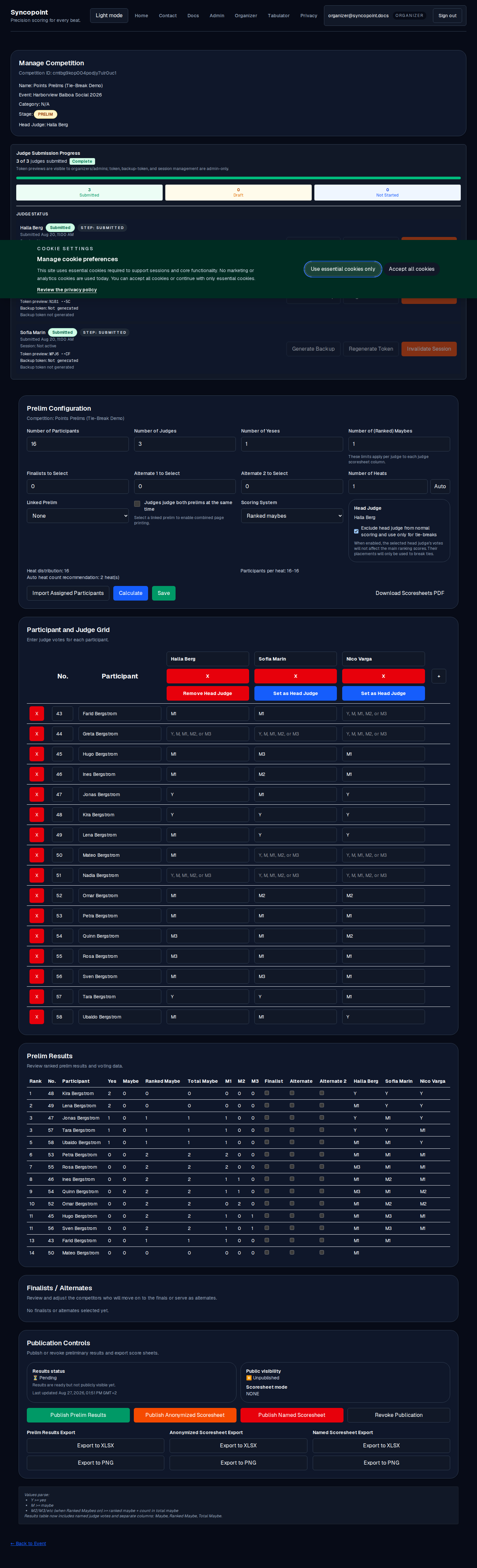
Once you Save the configuration and Calculate, the ranking appears in Prelim Results. You commit both steps yourself; there is no higher permission you need for this page.
Verify
Once the configuration is committed, the confirmation reads Saved competition data successfully. After that:
- In Prelim Results, the ranking will be empty until Calculate has been run (or until all judges have submitted and the results are recalculated).
- The Publication Controls section is now live, and you can publish or unpublish there yourself.

Common mistakes
- A high heat count for a small field. 12 participants and 4 heats works, but each heat has 3 dancers and the judges get a very short sheet. For small fields, 1 to 2 heats is typical.
- Changing the Scoring System without saving. The system only takes effect after a save, and the public page and the results reflect the saved value.
- Mixing up "Number of Judges" and the head judge. The head judge is chosen from the judge list. They are one of the judges, not an extra column.