Running the event
Monitor Judging Progress
Watch judge submissions in real time: who is done, who has a draft, who has not started.
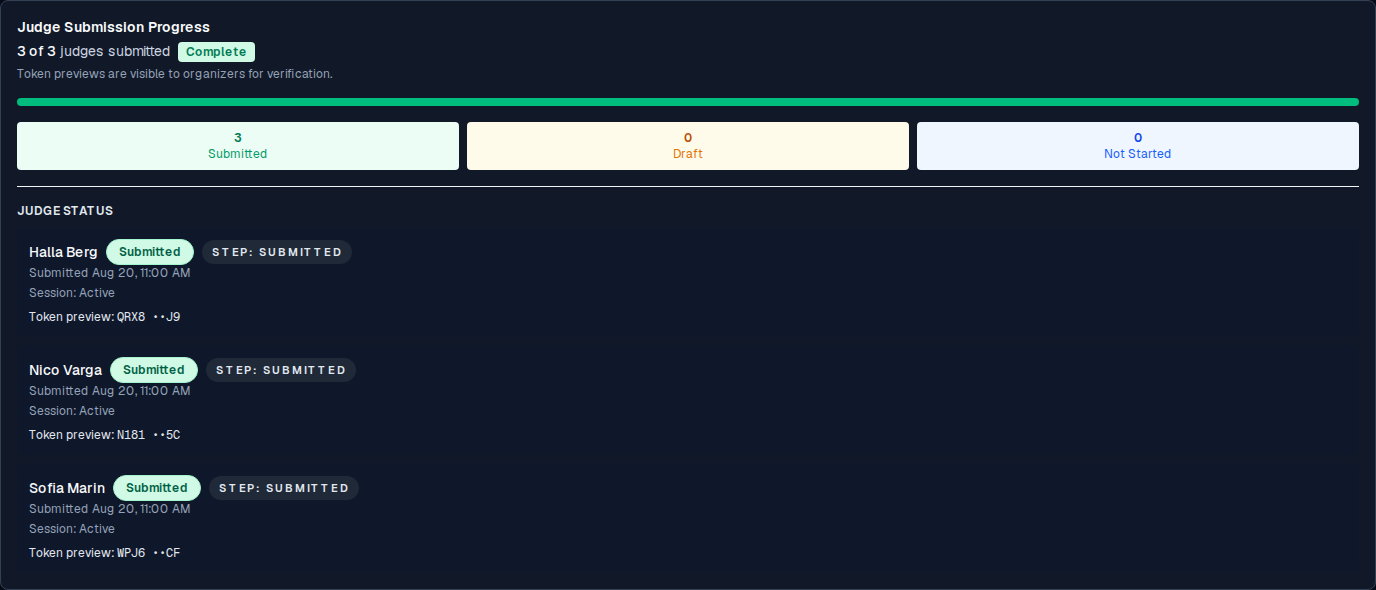
On the organizer's competition page, the Judge Submission Progress card is your event-day dashboard. It shows, for each judge:
- Name: the judge's name (as you set it in Add judges).
- Status: one of Not Started, Draft, or Submitted.
- Step: where they are in the flow (Token entry, Scoring, Review, or Submitted).
- Token preview: a masked preview, for verification only (do not use it to sign the judge in).
The card also shows a x of y judges submitted count and a progress bar, and it auto-refreshes every 7 seconds. No need to reload.
Reading the statuses
| Status | What it means |
|---|---|
| Not Started | The judge has a token and a name but has not opened their scoring page (or has not saved any draft yet). |
| Draft | The judge has opened the page and autosaved at least one draft. They are working. |
| Submitted | The judge has published. Their submission is final and locked. |
What you can and cannot see
- You can see the status, the step, the judge's name, and a masked token preview.
- You cannot see the individual votes until the judge has submitted.
- You cannot change a judge's draft.
A judge stuck in Draft
A judge whose status is Draft for a while may be:
- in the middle of scoring (normal),
- confused by the form (walk them through it on their device),
- or have a token problem (see Judge errors and recovery).
If a judge does not appear in the card at all (no row), they were not added to the competition. See Add judges.